Australian Owned Business

Motorised Blind Wall Switches
Control your motorised blinds from a convenient fixed position with wireless wall switches from Automate and Somfy.
Choose from simple single-channel controls, multi-channel switches for several blinds, or wall-mounted controllers for larger systems—all without needing control wiring inside the wall.

Convenient Control That Stays on the Wall
A motorised blind wall switch gives you a permanent control point beside a doorway, bed or window. There is no need to find a handheld remote or open an app whenever you want to move your blinds.
The switches on this page communicate wirelessly with compatible motors. They are battery powered and surface mounted, so installing the wall control itself does not normally require new cabling or an electrician.
Use a wall switch to:
-
Open, close and stop motorised blinds
-
Control one blind or a group of blinds
-
Create separate channels for different rooms or areas
-
Recall a favourite blind position on compatible motors
-
Keep everyday blind control in one predictable location
Shop Automate Wall Switches
Automate wall switches provide fixed, wireless control for Automate ARC motorised blinds, curtains and compatible outdoor systems.
Automate Surface Mount Wall Switch
The Automate Surface Mount Wall Switch provides five-channel control in a versatile magnetic design.
Use the channels to control up to five individual blinds or groups. The controller attaches magnetically to its wall plate, allowing it to remain in a fixed location or be removed and used like a handheld remote.
It is an excellent option for customers who want a permanent wall position without losing the flexibility of portable control.
Automate Paradigm Wall Controllers
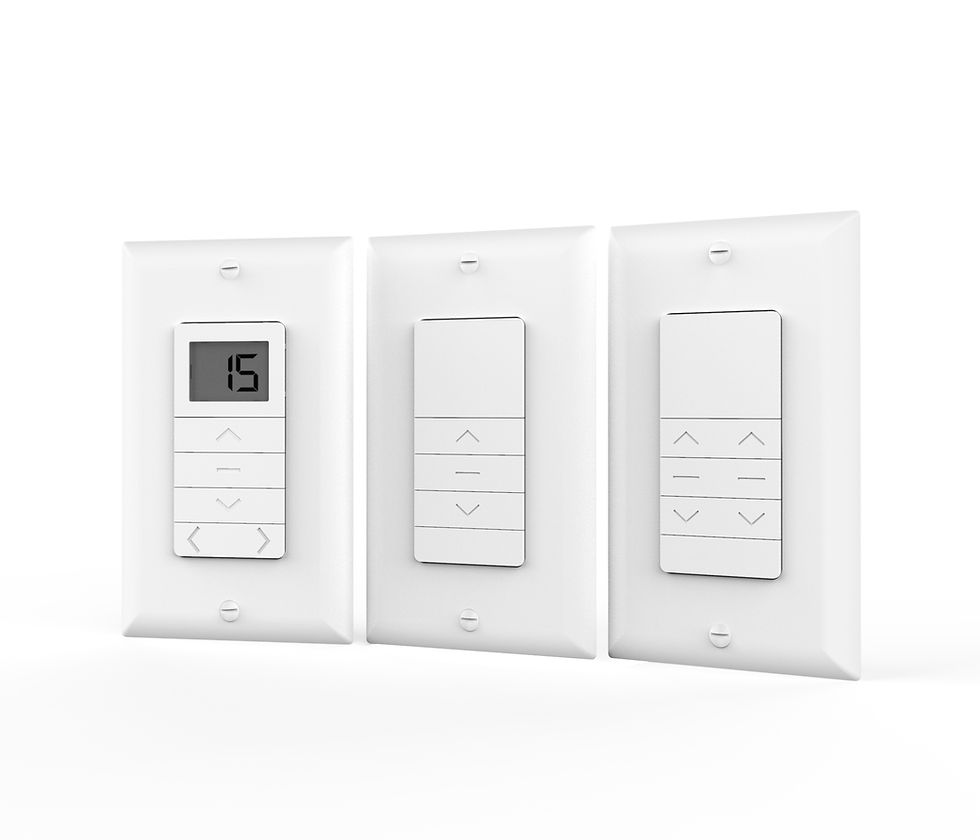
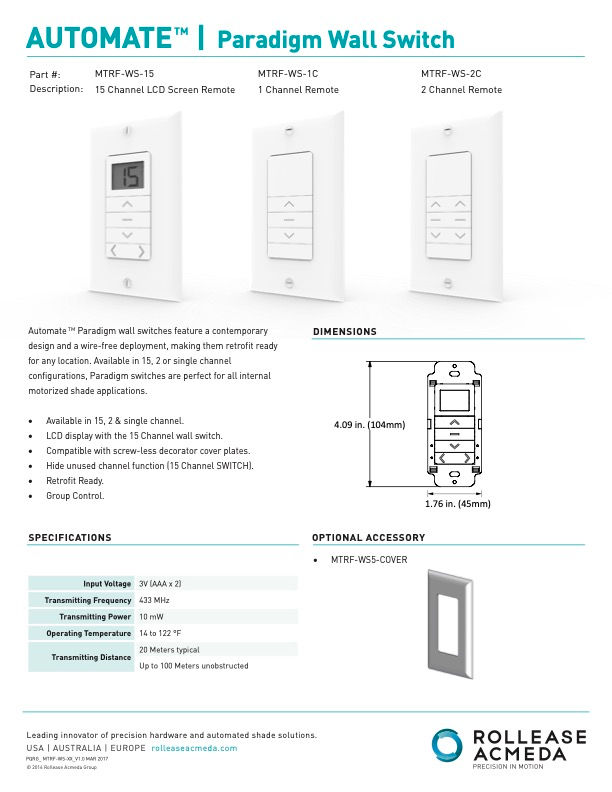
Automate Paradigm Wall Controllers are available in 1, 2 and 15-channel configurations.
Choose one channel for a single blind or group, two channels for separate blind areas, or the 15-channel model for a larger home or multi-room installation. The 15-channel version includes an LCD screen for easier channel selection and management.


Which Automate Wall Switch Should You Choose?
Choose the Surface Mount Wall Switch if:
-
You want five channels
-
You want a removable magnetic controller
-
You prefer the option of using it as a handheld remote
-
You are controlling several blinds or groups
Choose a Paradigm Wall Controller if:
-
You want a low-profile fixed wall control
-
You need 1, 2 or 15 channels
-
You want the 15-channel LCD option
-
You are controlling multiple rooms or a larger blind system
Shop Somfy Smoove RTS II Wall Switches
Somfy Smoove RTS II wall switches provide a clean, dedicated control point for compatible Somfy RTS motorised blinds, curtains, awnings, shutters and screens.
The switches are battery powered and surface mounted. Each control includes Up, Down and Stop/My buttons, allowing you to stop the blind or recall a favourite position stored in the motor.
Somfy Smoove 1 RTS II
The Smoove 1 RTS II is a single-channel wall switch for one compatible Somfy RTS motor or one group of RTS motors.
It is the best choice when all connected blinds should operate together. A Pure white single frame is included.
Somfy Smoove 4 RTS II
The Smoove 4 RTS II provides four-channel control for several individual blinds or groups.
Use separate channels for different windows, rooms or blind groups while keeping everything accessible from one wall-mounted controller. A Pure white frame is included.
Smoove Frames and Finishes
Optional Smoove frames allow the controller to better match your interior.
Available options include Pure white, black and silver single frames, as well as a double Pure frame for mounting two compatible Smoove controls together.
![Somfy Smoove 1 RTS II Wall Switch – 1 Channel [1871347]](https://static.wixstatic.com/media/599916_ed37244189344a089298be03cba611ce~mv2.png/v1/fill/w_295,h_300,al_c,q_85,enc_avif,quality_auto/599916_ed37244189344a089298be03cba611ce~mv2.png)
![Somfy Smoove 1 RTS II Wall Switch – 1 Channel [1871347] with pure frame](https://static.wixstatic.com/media/599916_41adf34189094fccb2f3410b0cdcd12a~mv2.avif/v1/fill/w_300,h_300,al_c,q_80,enc_avif,quality_auto/599916_41adf34189094fccb2f3410b0cdcd12a~mv2.avif)
![Somfy Smoove 4 RTS II Wall Switch – 4 Channel [1871373]](https://static.wixstatic.com/media/599916_0f2d07e7ce404e81bd4d0b9b7deeb4e4~mv2.avif/v1/fill/w_300,h_300,al_c,q_80,enc_avif,quality_auto/599916_0f2d07e7ce404e81bd4d0b9b7deeb4e4~mv2.avif)
![Somfy Smoove 4 RTS II Wall Switch – 4 Channel [1871373] side view](https://static.wixstatic.com/media/599916_e807225facdf4b2f81b9cfc6f75284f2~mv2.avif/v1/fill/w_300,h_300,al_c,q_80,enc_avif,quality_auto/599916_e807225facdf4b2f81b9cfc6f75284f2~mv2.avif)
![Somfy Smoove Silver Frame [9015025]](https://static.wixstatic.com/media/599916_62f4af640394435fb69d19032ea03534~mv2.jpg/v1/fill/w_300,h_286,al_c,q_80,enc_avif,quality_auto/599916_62f4af640394435fb69d19032ea03534~mv2.jpg)
![Somfy Smoove Black Frame [9015023]](https://static.wixstatic.com/media/599916_2ba5cbde79794be8a4ef423a28ffd291~mv2.jpg/v1/fill/w_150,h_146,al_c,q_80,enc_avif,quality_auto/599916_2ba5cbde79794be8a4ef423a28ffd291~mv2.jpg)
![Somfy Smoove Double Pure Frame [9015238]](https://static.wixstatic.com/media/599916_445851ef50b94429be64b4e64be4634a~mv2.jpg/v1/fill/w_300,h_300,al_c,q_80,enc_avif,quality_auto/599916_445851ef50b94429be64b4e64be4634a~mv2.jpg)
![Somfy Smoove Pure Frame – White [9015022]](https://static.wixstatic.com/media/599916_776ac61bbf554cd48862e8194a14ef2a~mv2.jpg/v1/fill/w_300,h_283,al_c,q_80,enc_avif,quality_auto/599916_776ac61bbf554cd48862e8194a14ef2a~mv2.jpg)
How Many Channels Do You Need?
A channel can control one motor or a group of compatible motors.
One Channel
Best for one blind or several blinds that should always move together.
For example, three blinds across the same window can be programmed to one channel and operated simultaneously.
Two to Five Channels
Best for individual control of several blinds, separate groups or different areas within the same room.
You could use one channel for the left blind, another for the right blind and another for every blind together.
Fifteen Channels
Best for larger homes, multiple rooms or installations containing numerous blind groups.
More channels allow you to organise control without requiring a separate switch for every blind.
Wall Switch or Handheld Remote?
Both options provide direct control without requiring a smart hub.
A handheld remote can move around the home, but it can also be misplaced. A wall switch stays in a convenient, predictable location and provides the familiar experience of operating a light switch.
A wall switch is particularly useful:
-
Beside the entrance to a room
-
Next to a bed
-
Near large windows or sliding doors
-
In accommodation or shared spaces
-
Where several people regularly operate the blinds
Many customers use both—a wall switch for everyday control and a handheld remote for additional convenience.
Do You Still Need a Smart Hub?
No. A compatible wall switch communicates directly with the motor and can operate your blinds without a smart hub, phone app or Wi-Fi connection.
Add a hub if you also want features such as:
-
Smartphone and app control
-
Automatic schedules and routines
-
Compatible voice control
-
Control while away from home
-
Integration with other compatible smart-home devices
A wall switch and smart hub can be used together. The wall switch provides immediate physical control, while the hub adds automation and connected-home features.

Easy Wireless Installation
These wireless wall switches are designed to mount to an interior wall without running control cables through the wall.
The wall control still needs to be paired with the compatible motor. Pairing instructions vary depending on the motor, switch and whether other controls have already been programmed.
Installing a wireless wall switch does not change the electrical installation requirements of the motor itself. Any 240V motor wiring must still be completed appropriately.
Wall Switches FAQs
Choosing a motorised blind wall switch can raise questions about compatibility, channels, installation and smart hubs. These answers explain how Automate ARC and Somfy RTS wall switches work and help you select the correct control for your blinds.
Can a wall switch control more than one motorised blind?
Yes. Multiple compatible motors can be programmed to the same channel so they move together as a group.
Does each blind require a separate channel?
Not necessarily. Use separate channels when you want independent control. Blinds that should always move together can share one channel.
Do wireless blind wall switches require an electrician?
The battery-powered wall controls themselves do not normally require control wiring or an electrician. However, this does not alter the installation requirements for any 240V motor or electrical supply.
Can an Automate wall switch control a Somfy motor?
No. Automate ARC and Somfy RTS use different control technologies and are not interchangeable.
Can a Somfy RTS wall switch control a Somfy Zigbee motor?
Not directly. The Smoove RTS II range is designed for compatible Somfy RTS motors and receivers, not Zigbee-only motors.
Can I use a wall switch and handheld remote together?
Yes. A compatible motor can generally be paired with multiple controls, allowing you to use a fixed wall switch and a handheld remote.
Can I use a wall switch with a smart hub?
Yes. The wall switch can provide direct physical control while the compatible hub adds app control, schedules and smart-home features.
Will a wall switch work if my internet is down?
Direct wireless commands between a paired wall switch and motor do not depend on your home internet connection.
Where should I install the wall switch?
Install it somewhere easy to reach, such as near a doorway, beside the bed or close to the window. Keep it indoors and within the recommended radio range of the motor.
How do I know whether I have an Automate or Somfy motor?
Check the motor label, existing remote or original documentation. If you are unsure, send us clear photographs before ordering and we will help identify the system.